
Life360: Live Location Sharing
Contains adsIn-app purchases

4.2star
22.1L reviewsinfo

USK: All ages
info
10Cr+
Downloads


About this app
Life360’s Family Locator simplifies life in the digital world by making it easy to stay connected to the people who matter most.
With Life360 you can:
• Create your own private groups, called “Circles,” of family members and chat with them in Family Locator for FREE.
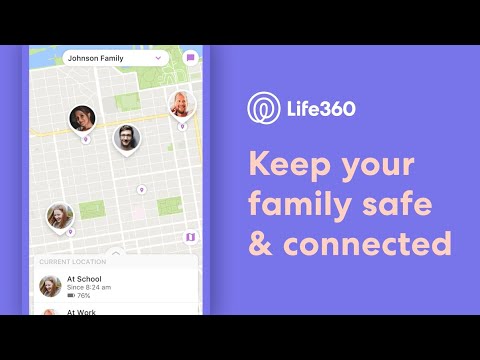
• View the real-time location of family members on a private family map that’s only visible to your Circle.
• Receive real-time alerts when family members arrive at or leave destinations (Eliminate disruptive “Where are you?” texts)
• See the location of stolen or lost phones
• Enjoy a more diverse array of features and benefits than those found on similar apps
• Works on both Android Phones and iPhones
Real-Time Location Sharing
Stay connected and in sync with your entire family and eliminate the multiple texts needed to coordinate your family events and daily life. Family Locator alerts you when your family members have checked in at a location and thanks to GPS sensors in your phone, family locator can also advise if someone is running late.
Finding Family
The Life360 app uses state-of-the-art GPS location technology to report the real-time whereabouts of family members that have accepted your invitation to join your circle and share their location. Simply install the Life360 Family Locator app on your phone, and invite your family. Once registered, each member appears as a unique icon on the navigational map so you’ll know exactly where they are. No need to send annoying “Where are your?” or “What’s your ETA?” texts, the Life360 Family Locator puts this information at your fingertips. And to make life super easy, we send you alerts the moment your family arrives at an appointed location!
In order for our app to work properly, we need a few permissions. Don't worry - when you create an account, we help you through this quick and easy process.
Location - Life360 locates you and your family members on a shared, private map. This setting allows us to show location accurately and quickly.
Phone permission - Life360 has a feature called Driver Care Support that, with a single push of a button, connects you to a live representative over the phone. Our live representative knows who you are and where you are to assist in roadside situations such as tows, jumps, and lockouts. We also offer an immediate emergency response in the case of a vehicular collision. Phone permissions allow us to connect your phone to the live representative and authenticate that you are the one calling them.
Network - This connects you to the Internet and allows us to send and receive location information to and from family members on your private map.
With Life360 you can:
• Create your own private groups, called “Circles,” of family members and chat with them in Family Locator for FREE.
• View the real-time location of family members on a private family map that’s only visible to your Circle.
• Receive real-time alerts when family members arrive at or leave destinations (Eliminate disruptive “Where are you?” texts)
• See the location of stolen or lost phones
• Enjoy a more diverse array of features and benefits than those found on similar apps
• Works on both Android Phones and iPhones
Real-Time Location Sharing
Stay connected and in sync with your entire family and eliminate the multiple texts needed to coordinate your family events and daily life. Family Locator alerts you when your family members have checked in at a location and thanks to GPS sensors in your phone, family locator can also advise if someone is running late.
Finding Family
The Life360 app uses state-of-the-art GPS location technology to report the real-time whereabouts of family members that have accepted your invitation to join your circle and share their location. Simply install the Life360 Family Locator app on your phone, and invite your family. Once registered, each member appears as a unique icon on the navigational map so you’ll know exactly where they are. No need to send annoying “Where are your?” or “What’s your ETA?” texts, the Life360 Family Locator puts this information at your fingertips. And to make life super easy, we send you alerts the moment your family arrives at an appointed location!
In order for our app to work properly, we need a few permissions. Don't worry - when you create an account, we help you through this quick and easy process.
Location - Life360 locates you and your family members on a shared, private map. This setting allows us to show location accurately and quickly.
Phone permission - Life360 has a feature called Driver Care Support that, with a single push of a button, connects you to a live representative over the phone. Our live representative knows who you are and where you are to assist in roadside situations such as tows, jumps, and lockouts. We also offer an immediate emergency response in the case of a vehicular collision. Phone permissions allow us to connect your phone to the live representative and authenticate that you are the one calling them.
Network - This connects you to the Internet and allows us to send and receive location information to and from family members on your private map.
Updated on
Safety starts with understanding how developers collect and share your data. Data privacy and security practices may vary based on your use, region and age. The developer provided this information and may update it over time.


Ratings and reviews
4.2
22L reviews

Joe Lewin
- Flag inappropriate
14 April 2026
Overall the app is great at showing where someone is, but there are minor glitches. It will give a notification someone has arrived home when they're still 1/4 mile away. Can't add a strip mall that far away because it thinks it's home. If someone is riding a train it says they're driving. If two people ride together in a car, they're both driving.
27 people found this review helpful

Brandi Keesee
- Flag inappropriate
15 April 2026
Was working great until the last week. Every morning it keeps saying a person on my life360 has left and returned home when they haven't left at all. Also shows a map as if some of us are moving around on our properties all night and it is saying we are driving way faster than we are. This is going to get kids in trouble when they are actually not speeding. My app is completely updated. I've already uninstalled and reinstalled but it didn't help. How do I fix this?
20 people found this review helpful

Megan
- Flag inappropriate
- Show review history
8 May 2026
Idc about the life360 gold, so stop forcing to full screen every time I open the app when finding my family! Half of the towns on the map don't show a name no matter the zoom. also get rid of the stupid quick emotes!! I'm tired of accidentally tapping them and interrupting my family. Cars can't read these emotes to you so it's more dangerous than just sending her a text that her car can read to her. stop with the audio, the emote is meant for the other person so why would i want to hear it?!
86 people found this review helpful
What's new
In this update, we've squashed some bugs and fine-tuned the performance, ensuring a smoother and more efficient experience for you.
App support
About the developer
Life360, Inc.
googleplay@life360.com
1900 S Norfolk St Ste 310
San Mateo, CA 94403-1171
United States
+1 415-212-9210


